
1.0 Introduction
This project explores the intersection of environmental education and engaging gameplay, focusing on how gamification can raise awareness of pressing issues such as the Urban Heat Island (UHI) effect. The primary purpose of this project is to educate users about these environmental challenges while inspiring behavioral change.
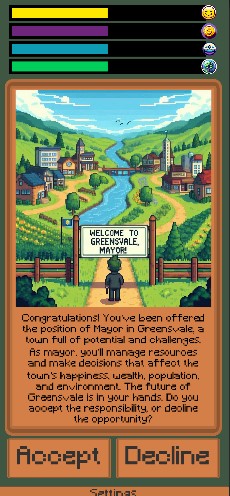
Figure 1: Imagery depicting end result of the project
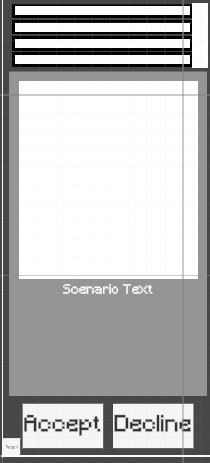
Figure 2: Imagery depicting an early prototype
1.2 Problem Statement
Urban areas are increasingly affected by worsening heat waves caused by the Urban Heat Island (UHI) effect. Public awareness of the UHI effect and its impact is limited, and current educational tools are not sufficiently effective in driving change.There is a growing need for engaging and innovative methods, like gamification, to encourage behavioral changes that address this issue. The increasing intensity of urban heat poses serious health risks, including heightened rates of respiratory and cardiovascular diseases. This phenomenon exacerbates existing inequalities, particularly in densely populated and underserved areas. Research highlights that these challenges will persist without effective public education and engagement, placing further strain on urban communities and ecosystems.
1.3 Aims & Objectives
Aim 1: Raise awareness for climate change specifically the Heat Island effect through the use of a game.
Aim 2: Evaluate user interaction design on mobile device UI to ensure end-user accessibility and retention.
Aim 3: Design and prototype a game concept informed by primary research.
Objective 1: Use secondary research to implement ways games can be used to educate and raise awareness.
Objective 2: Identify and analyze secondary research to determine industry-standard accessibility and retention methods to find what causes loss of user retention.
Objective 3: Use primary research(a survey and user feedback) to determine how to increase engagement.
These aims and objectives guided the project development and aligned the design process with the overarching goals of creating an educational yet entertaining experience.
2.0 Research & Insights
2.1 Research Process
Research utlized several methods which inlcuded: Survey/Questionnaires,Playtest, User Interviews
Survey/Questionnaires were designed to collect quantitative data on user preferences, demographics, understanding/familiarity with environmental issues, and opinions of current gameplay systems. Questions also targeted gaming habits and design elements that users enjoyed/disliked, this ensured the game concept aligned with audience expectations/preferences.
Playtests were conducted with a prototype to observe user interactions and gather real-time feedback on the game’s usability, mechanics, and educational content. This hands-on approach allowed for iterative design improvements, focusing on balancing gameplay and educational elements.
One-on-one interviews provided qualitative insights into user experiences and expectations.Participants provided feedback on the game's visual design, their learning experience, and ways to improve accessibility and engagement.
This comprehensive research process ensured the project was informed by real user needs and preferences, which played a pivotal role in shaping the final game design. It also highlighted areas for refinement, such as simplifying UI elements and enhancing game replayability.
2.2 Key Findings
The research process revealed much insight into user preferences, what they did/didn’t enjoy, and overall learning/gaming trends, among participants which shaped the direction of the project.Users showed a strong affinity for storytelling and narrative-driven experiences, with puzzle-style games being the most favored genre.Adventure, simulation, and strategy games also ranked highly, suggesting a preference for engaging and thought-provoking gameplay. Participants highlighted the difficulty of navigating text-heavy sections, which impacted the overall engagement and learning experience. The lack of consistent theming in the prototype diminished its appeal and coherence.A notable disinterest in games marketed as educational suggested the need for a subtler, more engaging approach to branding and positioning. There was a common belief among users that mobile games can be used as effective educational tools. A significant portion of the audience plays mobile games somewhat regularly, indicating a viable platform for this project. The majority of participants were young adults aged 18-24, predominantly male, providing a clear demographic to target for initial iterations. These findings reveal the importance of balancing engaging gameplay with educational objectives and highlight areas requiring refinements, such as text density and thematic consistency.
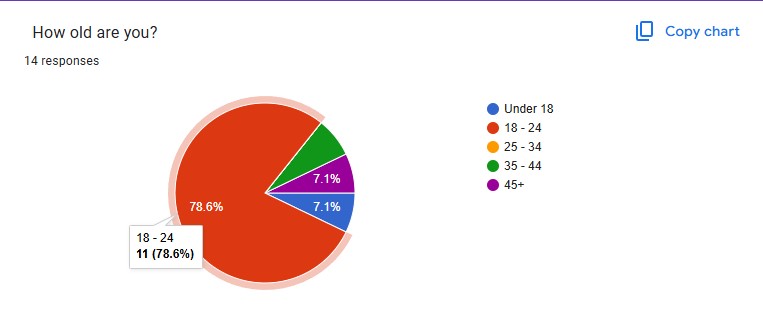
Figure 3: Research chart documenting participant age
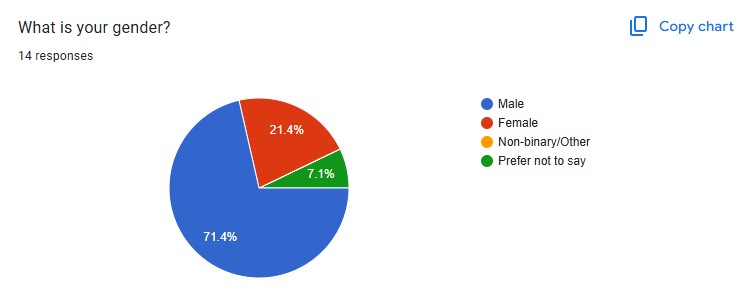
Figure 4: Research chart documenting participant gender
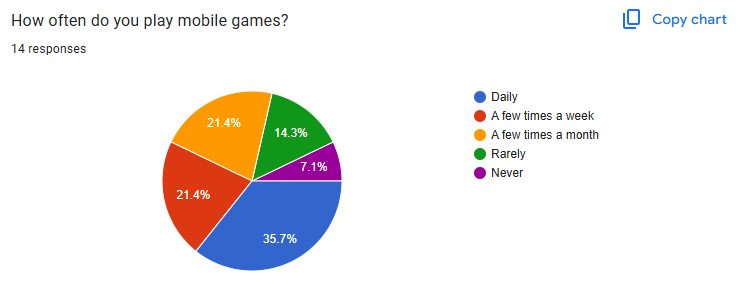
Figure 5: Research chart documenting participant engagement with mobile games
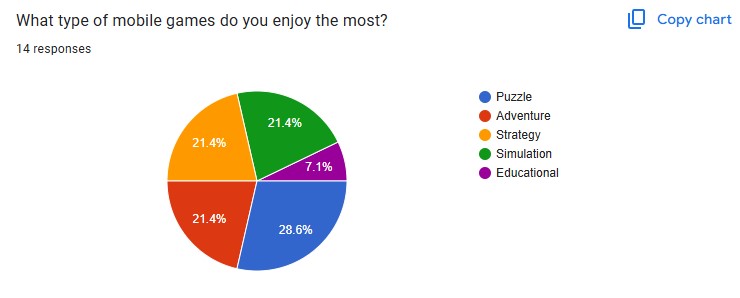
Figure 6: Research chart documenting participant favorite genere of mobile games
3.0 Ideation & Design Development
3.1 Ideation Process
The development of this project began with brainstorming and creative exploration. A concept was developed quite quickly, a game similar to Reigns: 3 Kingdoms(a strategy/roleplaying card game where the player is a ruler of a kingdom and must manage the resources) with a focus on environmental issues. Sketches, and notes, were used to further explore the concept. The ideation phase focused on designing a game that could educate users on the Urban Heat Island (UHI) effect and other environmental issues while keeping gameplay engaging. Key ideas included: Gamified Learning:Incorporating decision-based mechanics inspired by popular mobile games like Reigns: Three Kingdoms.mmersive Experience: A focus on visual and auditory elements to create a calm, engaging environment. User-Centric Design:Ensuring gameplay encourages interaction while seamlessly delivering educational content.
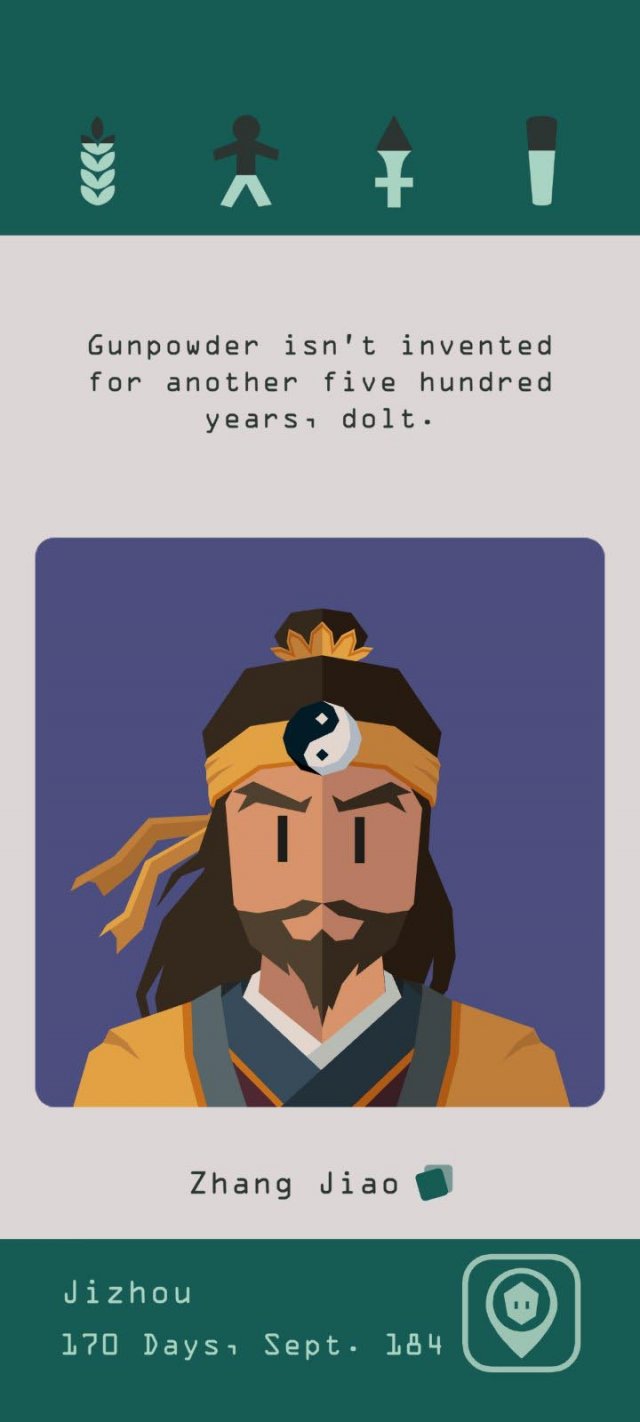
Figure 7: An image of the game that inspired the project's concept "Reigns:3 Kindoms"
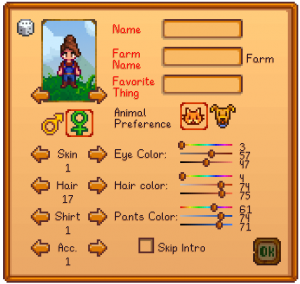
Figure 8: An image of the game that inspired the project's artstyle "Stardew Valley"
3.2 Design Choices
The design choices were informed by industry-standard UI/UX practices with an emphasis on accessibility/simplicity and findings from user research:
UI Layout: Inspired by Reigns: Three Kingdoms, the interface was adapted to be intuitive while reflecting industry standards for mobile game design.
Color Palette: Natural tones were selected to evoke a sense of calm and connection to nature, drawing inspiration from Stardew Valley.
Music & Art: Online 8-bit music tracks were selected to create a nostalgic and calming vibe, while AI-generated pixel art illustrated in-game scenarios. These elements reinforced the educational and gaming aspects of the project.
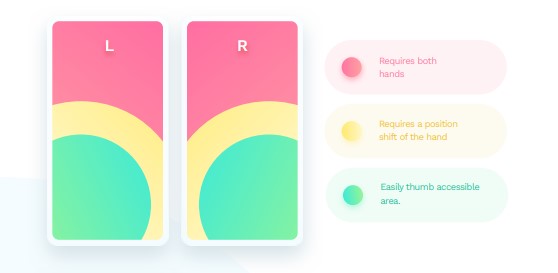
Figure 9: Secondary Research Demonstrating Intuitive Mobile Design
3.3 Prototypes & Testing
The project’s prototyping phase involved creating wireframes, scenario cards, and interactive prototypes. These resources can be found in full in the attached Google doc in the references section. User feedback played a critical role in shaping the final design. Key insights included:
Feedback on UI: Users requested clearer themes, less text, and more intuitive interactions.
Scenario Cards: Adjustments were made to improve clarity and engagement.
Resource Feedback: Resource bars and visual indicators were adjusted/added based on user input
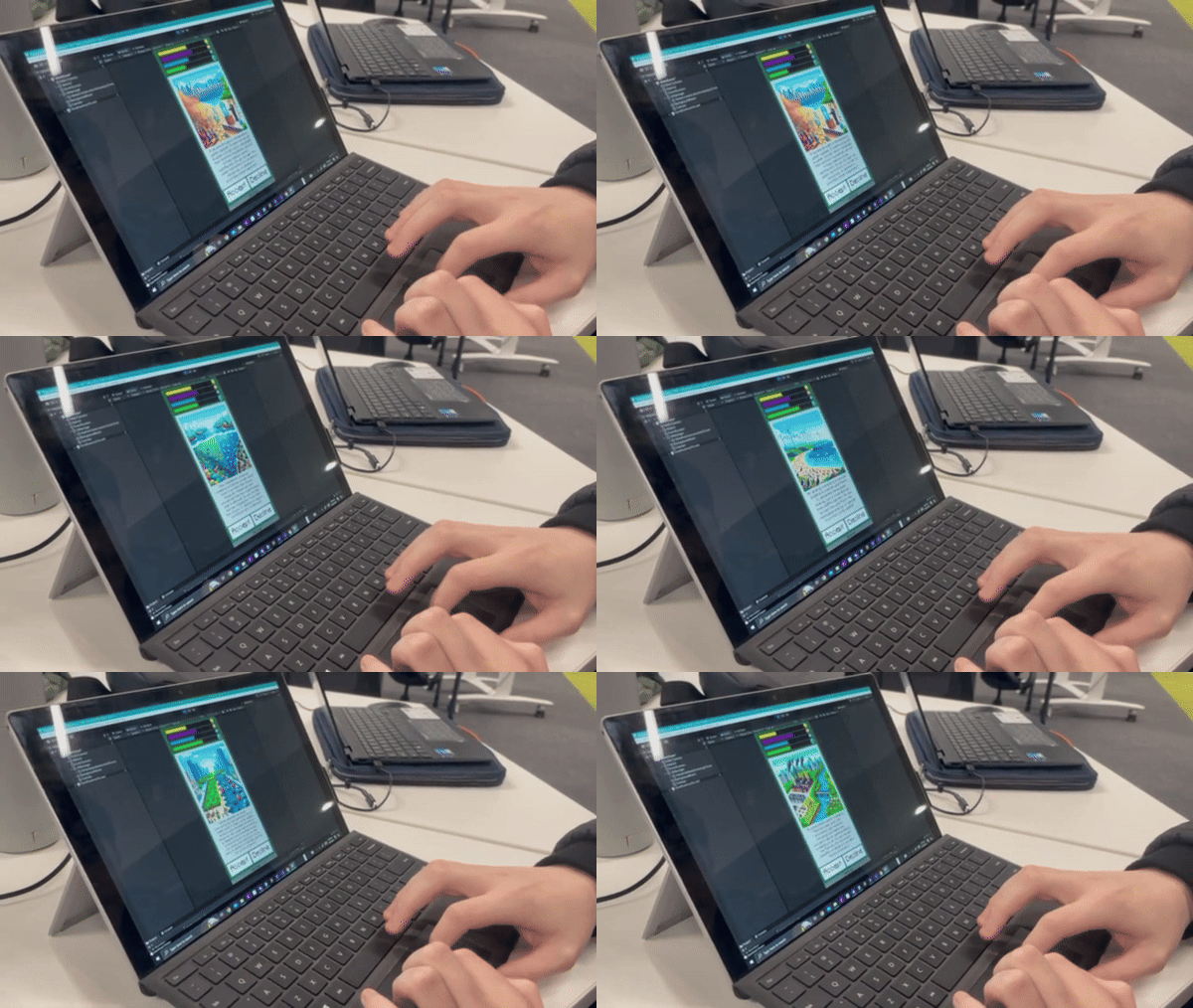
Figure 10: Live Participant Testing
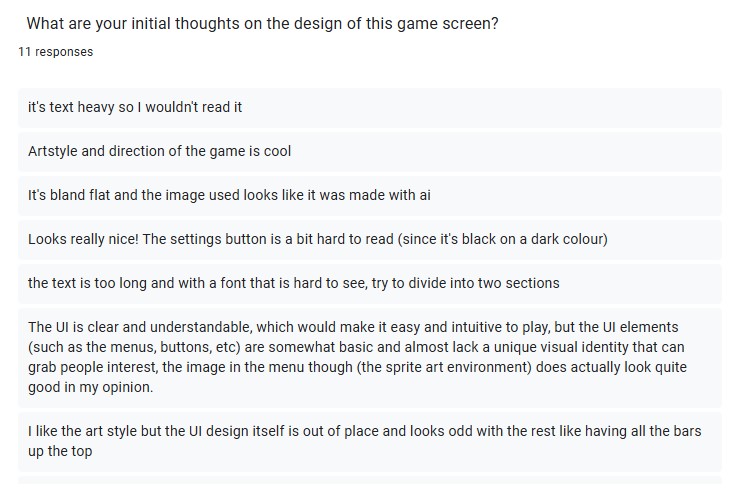
Figure 11: Particpant Feedback
4.0 Implementation & Iteration
4.1 Iterative Design Process
The project evolved through several iterative stages, addressing user feedback and refining gameplay mechanics. Highlights included:
Adding a Game Manager Script to track resources and provide debug feedback.
Enhancing Scenario Cards for clarity and accessibility.
Introducing Resource Bars to display progress dynamically.
Streamlining the UI to reduce text and increase visual appeal.
This iterative approach ensured that the final design was functional, polished, and aligned with user expectations. Many elements of the game were scaled back/reverted to increase the polish of the current product. Future editions may bring back these sections, these will be elaborated on further in the reflections and future steps section.
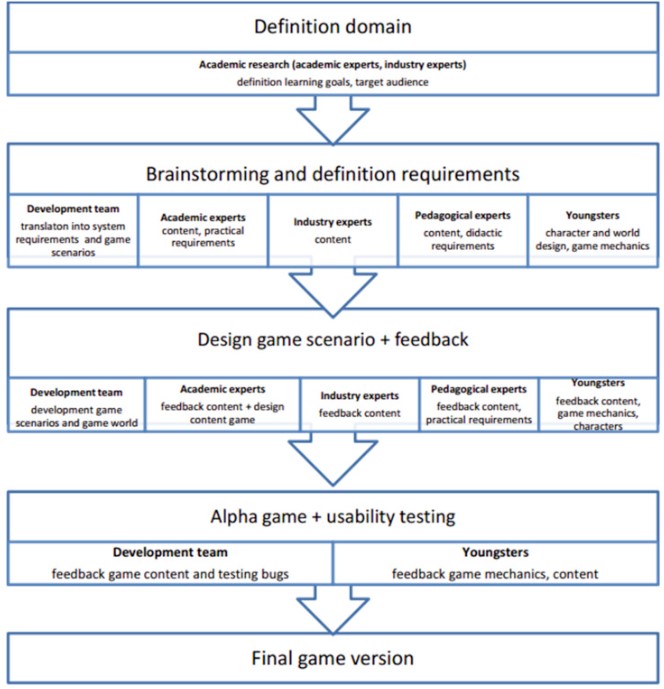
Figure 12: Secondary Research Guide to Iterative Design
4.2 Challenges & Solutions
Throughout development, various technical and design challenges arose:
UI Button Issues: Resolved by implementing new logic to the Input Manager script to create a dedicated UI Manager Script.
Card Value Mechanics: Redesigned to allow adjustments for decision-based gameplay
Version Control: Addressed by standardizing the Unity version across devices.
Most issues typically resulted from an error within the Unity inspector, normally caused by an assignment error or the script not obtaining all the necessary game objects when starting. However, the 3 issues above stood out due to their underlying problems. The card value mechanic had an issue where no changes would occur on the decline this issue was caused by UI updates only occurring on accept. The script was later changed to update the UI on decline, allowing values to differ for both accept and decline. For example, accept environment may increase by 10 points but on decline decrease by 5 points. The aforementioned issues went hand and hand with the UI button issues, both issues were fixed simultaneously by modifying the Input Manager to become the UI Manager with the previously mentioned card changes. Lastly, the poor setup of the game's GitHub page resulted in version control issues that were solved by installing the correct version of Unity across all my devices(the GitHub page can be found below in the resources section). These challenges were overcome often with great difficulty due to confusion however, these lessons can be carried on to future projects to increase future efficiency.
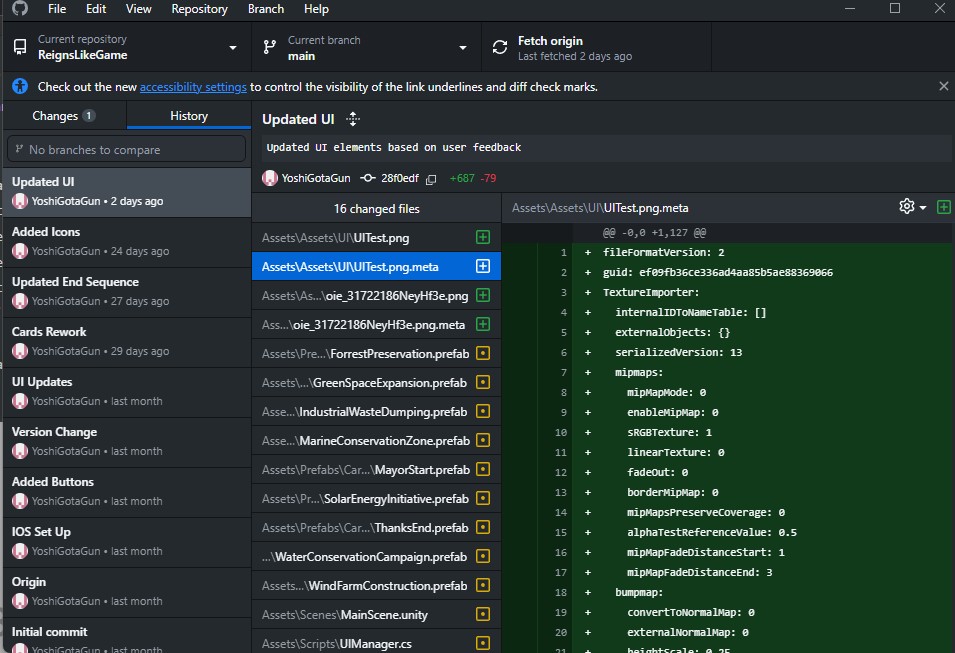
Figure 13: Game's GitHub page
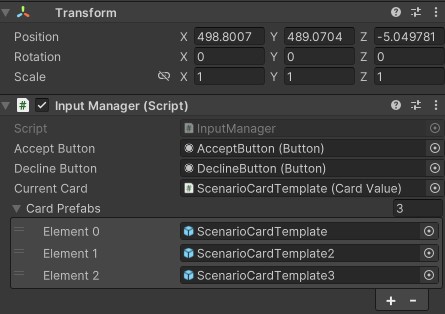
Figure 14: UI manager inspector tab within Unity
5.0 Script Details
5.1 UI Manager
The UIManager script was created to manage the game's user interface, card interactions, and transitions. Initially created as the game input manager then later changed to include UI elements and renamed to UIManager from InputManager. Due to this initial purpose, it is structured to handle player inputs (Accept/Decline), and manage UI elements like buttons and loading screens, while dynamically updating the game's card-based scenario system. The script can be understood by its 5 primary parts these include:
Initialization on Start: The script sets up card data from the CardValue script, sets up button listeners, and configures the starting card. It makes sure the UI reacts dynamically to user actions.
Card Handling: Each card has associated "Accept" and "Decline" resource impacts, handled by methods OnAccept and OnDecline. These apply resource changes through the GameManager and trigger UI updates based on the player's decisions.
End Game Display: When conditions are met, the DisplayEndCard method shows a pre-configured "End Card," indicating the game's conclusion. This is primarily present for the game's demo, and will later be updated to display different end cards based on the player's choices throughout the gameplay adding to the narrative of the game.
Dynamic Card Updates: The UpdateUI method selects and displays a random card from the remaining pool, maintaining variety and progression. This area will be discussed further in the challenges and solutions section as it caused many issues.
Loading Screen Transition: The ShowLoadingAndUpdateUI coroutine adds a loading effect between transitions, enhancing user experience. This section was later added based on user feedback and is currently unfinished, but is still present due to being entangled in an integral part of the game's code base.
This script's design allows card management and player interactions to be adjusted from Unity’s in-engine inspector. This makes the script highly adaptable and easily modified to fit user expectations. Audio feedback is present for future use but is currently notion use. All these elements converge to form a coherent script that handles all visual-related game updates.
Figure 15: UI manager inspector UI
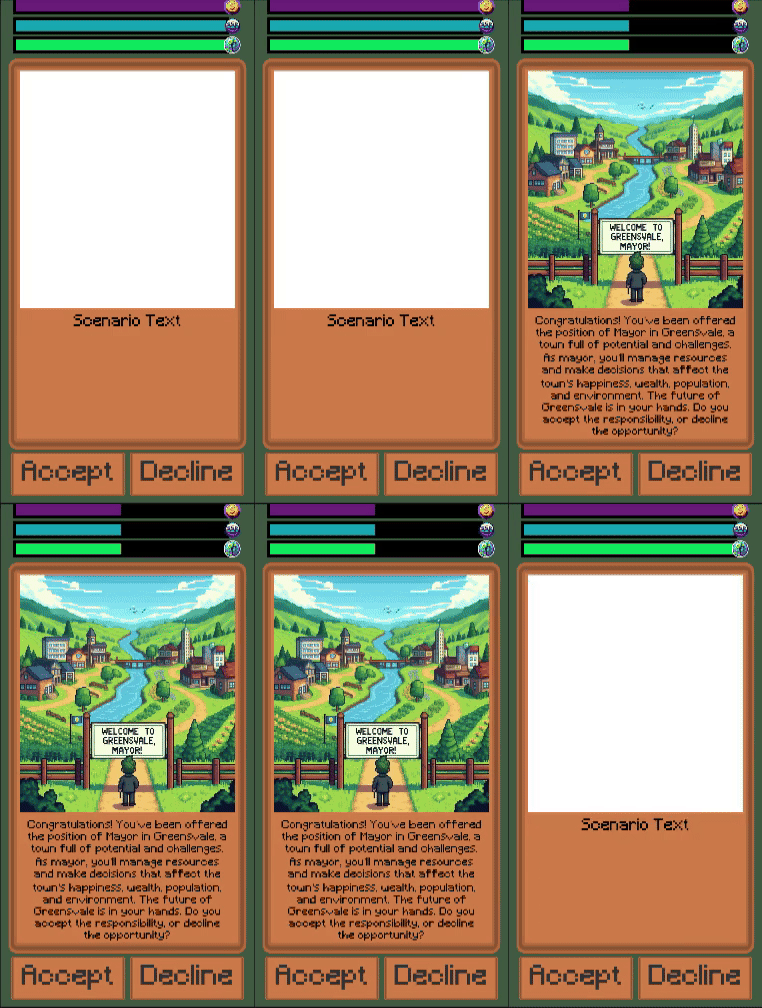
Figure 16: A demonstration of card initialization
5.2 Settings Menu
The SettingsMenu script provides functionality to toggle the visibility of a settings menu panel in Unity. The script contains one primary method, this is all it needs to complete its simple goal of displaying the game-setting menu. In the settings menu, the player can adjust the game’s master volume, sound effect volume, and music volume. In the present iteration there is no logic to allow the UI to function this logic will later be added to this script.
The primary function of the script was its menu visibility toggle. The OpenSettingsMenu method uses the SetActive function to enable or disable the menu panel based on its current state. This toggle functionality allows for seamless opening and closing of the settings menu.
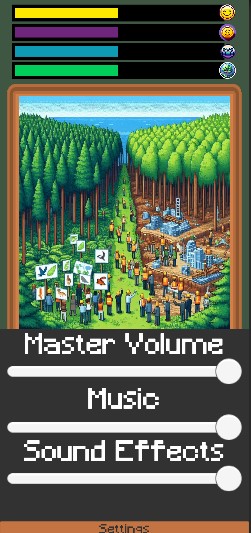
Figure 17:Temporary setting menu
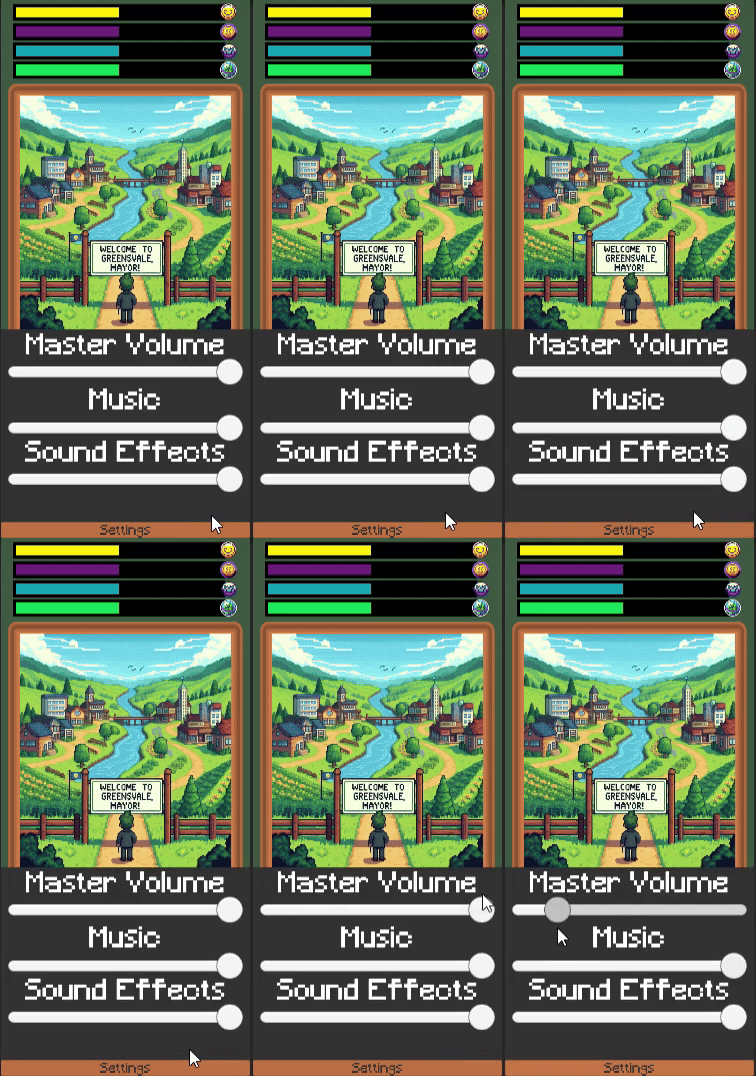
Figure 18:The menu in action
5.3 Resource Bars
The ResourceBar script is designed to visually represent a resource (e.g., health, energy, or progress) in a Unity UI. The script adjusts a UI Image component's fill amount to reflect the resource's current value as a percentage of its maximum value. Its primary function is to adjust visual UI resource bars based on the hidden values stored by the game manager.
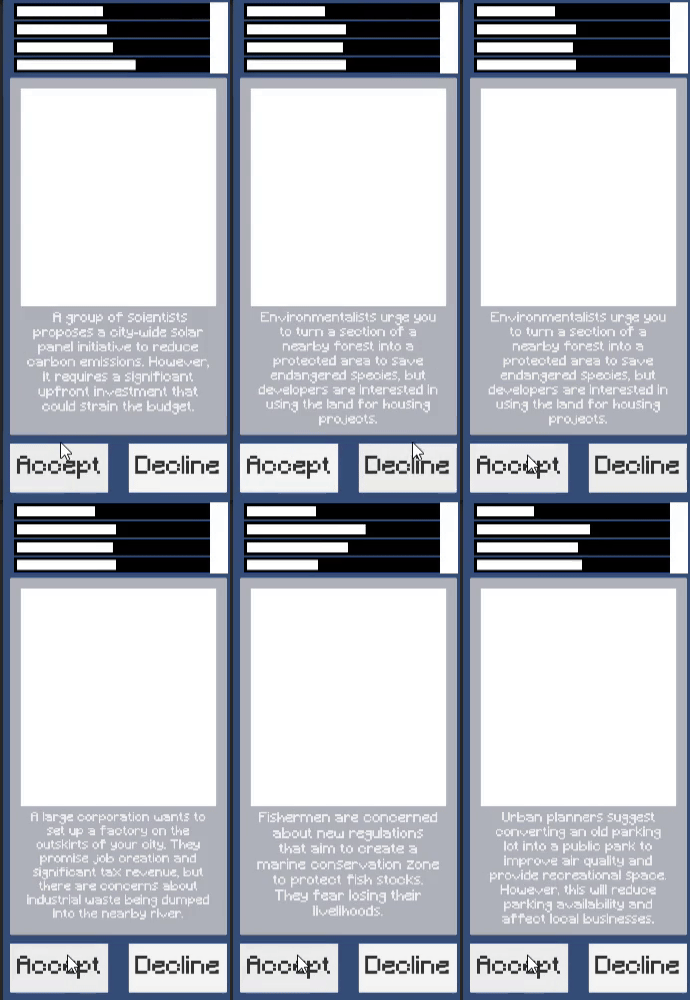
Figure 19: Early resource bar testing
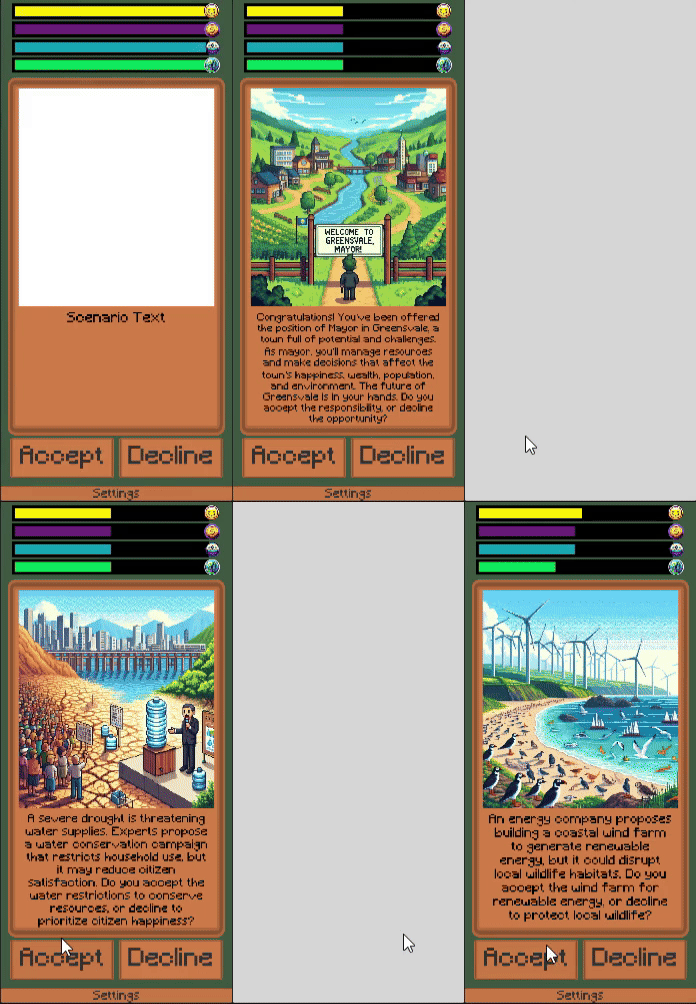
Figure 20: End Result
5.4 Game Manager
The GameManager script acts as the core system for handling game state, player resources, and interactions between gameplay elements. It ensures consistent management of resources and triggers appropriate responses during critical events. There are 5 key parts to it these include:
Resource Management:Tracks four critical resources happiness, wealth, population, and environment. Each resource starts at a value of 50(which can be changed in the inspector) and is updated during gameplay.
Resource Management:Tracks four critical resources: happiness, wealth, population, and environment. Each resource starts at a value of 50(which can be changed in the inspector) and is updated during gameplay.
UI Integration: Includes ResourceBar references to visually display resource values. Synchronizes resource values with the UI on initialization and after changes.
Initialization: When starting, sets up the resource bars to their starting values.
Dynamic Updates: Modifies resource values based on input(accept or decline). Ensures resource values are between 0 and 100. Updates the UI with the new values. Monitors resources, triggering the game over condition if any value drops to 0.
Game Over Handling: If a resource reaches zero, it calls the UIManager's DisplayEndCard to display the end-game screen. The current end card thanks all participants but there are plans to change this in the future. This will be adjusted later to emphasize the consequences of resource depletion.
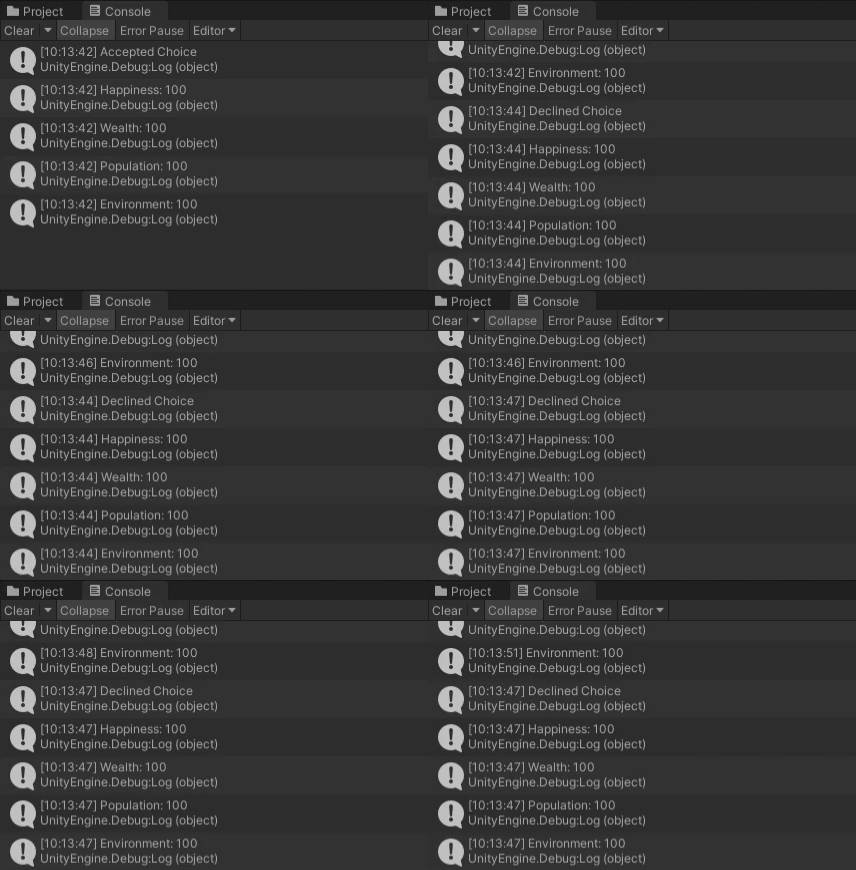
Figure 21: Game Resource Testing In Debug Log
Figure 22: Game Manager Working with Early Resource Bars
5.5 Card Values
The CardValue script defines the structure and behavior of cards in the game. Its purpose is to store the card data and card UI data.It contains three primary functions these include the following:
Scenario Content: Stores details about the scenario to display on the card.
Resource Effects: Defines the effects of player choices (Accept and Decline) on four core resources: happiness, wealth, population, and environment.
SetupCard Method:Helps initialize the card UI.Ensures that each card accurately represents its predefined scenario when displayed.Allows for quick balance adjustments to be made to prefabs.
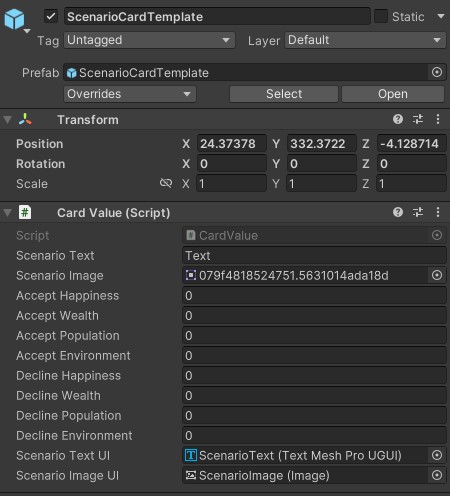
Figure 23:Inspector in Unity for editing card values
Figure 24: Early Prototype scenario card before setup
6.0 Final Outcome & Impact
6.1 Final Solution
The final product is an educational game prototype that combines gamified learning with a visually appealing design. With its accessible gameplay, calming aesthetic, and educational content, the game successfully raises awareness about the Urban Heat Island (UHI) effect.
Figure 25:Current gameplay with temporary loading screen
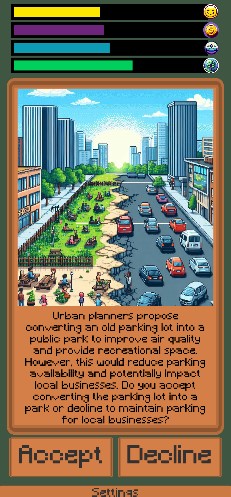
Figure 26: Final UI design
6.2 Impact & Results
The game’s concept was well-received by users, with testimonials highlighting its thought-provoking identity.
Key outcomes included:Educating players about UHI through interactive storytelling and encouraging user retention through game mechanics and aesthetics.
Metrics and feedback demonstrated the project’s potential as a tool for raising environmental awareness while maintaining user engagement. Results show a potential need to rebrand and change user perception. Users believe the game uses good methods, but are mixed on whether they would play it.

Figure 27: Participant opinion of genres to convey awarness
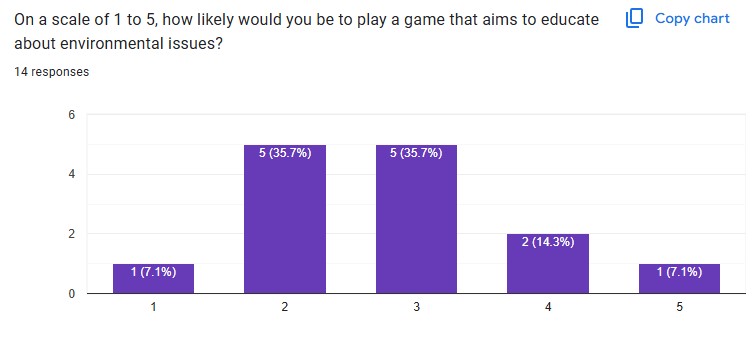
Figure 28: Participant likelyhood of potentially playing the game (1 = Unlikley 5 = Likely)
7.0 Reflection & Future Steps
7.1 Reflection
This project allowed for a detailed exploration of Unity’s UI system how it works and what practices people like. While there are several areas in need of improvement and expansion the current product gets the basic point across. The lessons learned from this endeavor will be used to influence the design of future projects to avoid the mistakes made here.
What Worked: The Card Value Setup system was highly adaptable and easy to use, allowing data entry into the inspector to generate cards with specific attributes. The UI Manager's coroutine system allowed transitions between cards, creating smoother user interactions. The Game Manager's resource tracking updated UI elements, enhancing gameplay coherence. The questionnaire effectively captured user trends and preferences, aiding audience targeting and content creation.
Areas of Improvement: UI fidelity needs enhancement to improve visual polish and user navigation. Additional gameplay systems are required to address replayability concerns. Expanding the card library would increase play time enhancing the gameplay experience. Reducing educational text while focusing on engaging gameplay mechanics is crucial for user retention. Refining user playtest and questionnaire methods to avoid bias in data collection.
Lessons Learned: Proper use of a Game Manager simplifies hidden system tracking, such as resource amounts. UI hierarchy and sort order are vital for visual clarity and display layering.
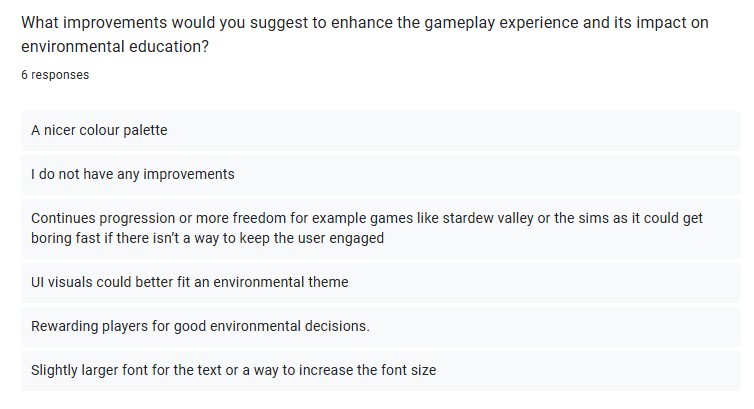
Figure 29: User Feedback that Formed Future Design Plans
Figure 30: Image that shows temporary white loading screen
7.2 Recommendations & Next Steps
Future work will focus on enhancing gameplay systems, improving user retention, and expanding the game’s overall impact. This plan was formulated based on participant feedback and insights gained from the surveys.
Future Work Plan: Integrate proven user retention methods such as streaks, notifications, and rewards. Reduce educational content and emphasize engaging gameplay mechanics. Address replayability by implementing complex systems, such as randomized scenarios or event cards. Finalize incomplete features, including complete loading screens, polished menus, sound effects, and smoother UI transitions. Refine content to align with target audience preferences, ensuring accessibility and engagement.
Areas of Improvement: Broaden the audience by conducting more frequent and large-scale user tests. Develop systems encouraging returning users, such as gamified rewards or challenges. Expand the gameplay loop with advanced systems, increasing depth and encouraging long-term user retention. dapt findings to new demographics and markets, growing the game’s educational reach and relevance.
9.0 Reference List
9.1 References
- De Jans, S., Van Geit, K., Cauberghe, V., Hudders, L. and De Veirman, M. (2017). Using games to raise awareness: How to co-design serious mini-games? Computers & Education, 110, pp.77–87. Available online
- Beddow, H. (2022). How the urban heat island effect makes cities vulnerable to climate change. [online] UKGBC. Available online
- Royal Meteorological Society (2017). Urban Heat Islands. [online] RMetS. Available online
- Faith (2023). Gamification in Education: Engaging Students with Apps. [online] Studio 14. Available online
- Cheung, S.Y. and Ng, K.Y. (2021). Application of the Educational Game to Enhance Student Learning. Frontiers in Education, 6(6). Available online
- From Duolingo to Wordle: how educational games are changing the way we learn | NCFE. (n.d.). [online] Available online
- Uduak Udoudom, George, K. and Igiri, A. (2023). Impact of Digital Learning Platforms on Behaviour Change Communication in Public Health Education. Pancasila International Journal of Applied Social Science, 2(01), pp.110–125. Available online
- Scrimmage. (2024). LinkedIn. [online] Available online
- Lenzholzer, S., Carsjens, G.-J., Brown, R.D., Tavares, S., Vanos, J., Kim, Y. and Lee, K. (2020). Urban climate awareness and urgency to adapt: An international overview. Urban Climate, 33, p.100667. Available online
- Meade, E. (2021). What environmental education gets wrong. [online] Available online
- Smiderle, R., Rigo, S.J., Marques, L.B., Peçanha de Miranda Coelho, J.A. and Jaques, P.A. (2020). The impact of gamification on students’ learning, engagement, and behavior based on their personality traits. Smart Learning Environments, 7(1), pp.1–11. Available online
- Manager, H., Email, Y., Malewicz, M. and Malewicz, D. (n.d.). Przewodnik po Bali Anne Snowdon a Aa Aa Aa SEND SEND Fill the form Classic tshirt Tropical House Mix Designing User Interfaces. [online] Available online
- Galitz, W. (n.d.). The Essential Guide to User Interface Design An Introduction to GUI Design Principles and Techniques Third Edition. [online] Available online
9.2 Bibliography
- Mental Health America (2023). How Do Colors in My Home Change My Mood? Color Psychology Explained. [online] Available online
- EUSci (2020). The colours of nature. [online] University of Edinburgh Science Media. Available online
- Vujovic, S., Haddad, B., Karaky, H., Sebaibi, N. and Boutouil, M. (2021). Urban Heat Island: Causes, Consequences, and Mitigation Measures with Emphasis on Reflective and Permeable Pavements. CivilEng, 2(2), pp.459–484. Available online
10.0 Submission Specific Documents & Resources